


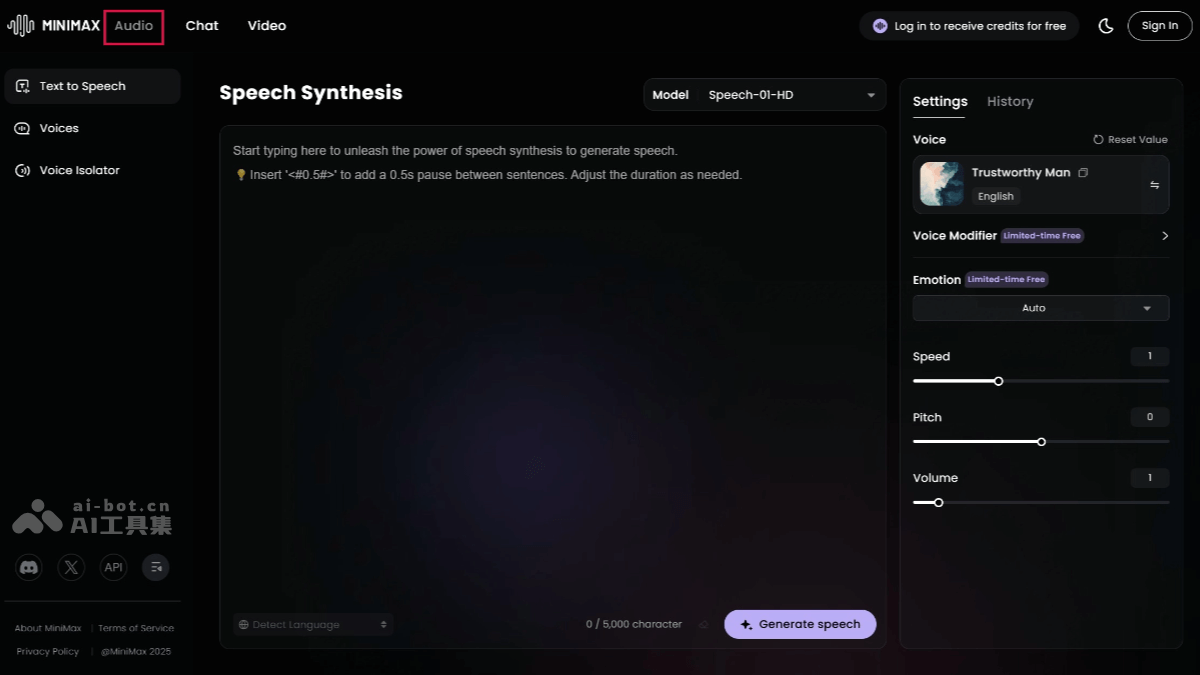
What is MiniMax Audio
MiniMax Audio is launched by MiniMaxAI speech synthesis toolcapable of creating realistic multi-lingual, multi-voice and multi-emotional speech. Supports text-to-speech (TTS), which can quickly convert text into natural and smooth speech. Users only need to provide 30 seconds of audio material, and a specific person’ssound cloningsupports 12 languages, including Chinese, Cantonese, English, etc. Provides speech synthesis for six emotions, such as happy, angry, sad, etc. MiniMax Audio has a noise reduction function that removes background noise and improves voice quality.
Main features of MiniMax Audio
-
Text to Speech (TTS): Convert text into natural and smooth speech, supporting multiple languages and dialects, including Mandarin, Cantonese, English, Japanese, Korean, etc.
-
sound cloning: Quickly clone a specific person’s voice, capturing subtle emotions and intonations with just 30 seconds of audio samples.
-
emotional support: Provides speech synthesis for six emotions, such as happy, angry, sad, etc., making the speech more realistic.
-
Multi-language support: Supports voice cloning in 12 languages to meet the needs of users in different languages.
-
Noise reduction options: Help users remove background noise and improve voice quality.
-
Very long text synthesis: Supports input of up to 10 million characters in a single synthesis, suitable for ultra-long text scenarios.
-
Customized sounds: Can reproduce thousands of timbre characteristics and generate unlimited sound variations, emotions and styles.
-
Real-time speech generation: Supports streaming voice output to reduce waiting time and is suitable for real-time scenarios such as live broadcasts and conversations.
How to use MiniMax Audio
- Visit official website: Visit the MiniMax Audio official website and register a login account.
- MiniMax Audio international version: https://www.minimax.io/audio (supports sound cloning)
- MiniMax voice domestic version: https://www.minimaxi.com/audio (sound cloning is not supported)
- Interface overview: On the homepage, you will see the main operation area, including text input box and speech synthesis button.
- Create a sound clone:
- Click the “Create a clone of your voice” button in the interface.
- Upload or record a piece of audio material. It is recommended to use about 30 seconds of audio to get a better cloning effect.
- Select the language of the audio material, MiniMax Audio supports multiple language options.
- Supports optional noise reduction options to improve audio quality.
- speech synthesis: In the TTS (Text to Speech) interface, enter the text that needs to be converted into speech. Choose the sound you just cloned or another sound provided by MiniMax Audio. Choose the desired emotion.
- Adjust settings: Adjust speaking speed, pitch and other settings as needed.
- Generate speech: Click the button and MiniMax Audio will process the request to generate speech. After waiting a few seconds for the processing to complete, the generated voice file can be played or downloaded.
Application scenarios of MiniMax Audio
- video dubbing: Add narration or character voiceovers to video content, especially when a specific voice style or language is required.
- Podcast production: Create podcast content without actual recording, generated directly through text-to-speech.
- animation and games: Provide realistic sounds for animated or game characters to enhance user experience.
- audiobook production: Convert text books to audiobooks, offering different sound and emotion options.
- Advertising production:Create catchy slogans and slogans.
- customer service: Provide an automatic voice response system to improve customer experience.
© Copyright statement